Every de-esser I tried made my vocals sound worse. So I stopped using them.
Started doing it manually instead—clip gain on every harsh S, every plosive, every breath. Volume automation drawn by hand, zooming in until I could see individual samples. Twenty minutes per track. But it worked.
Then I automated it. Same precision, same control. No more drawing curves at 2AM.
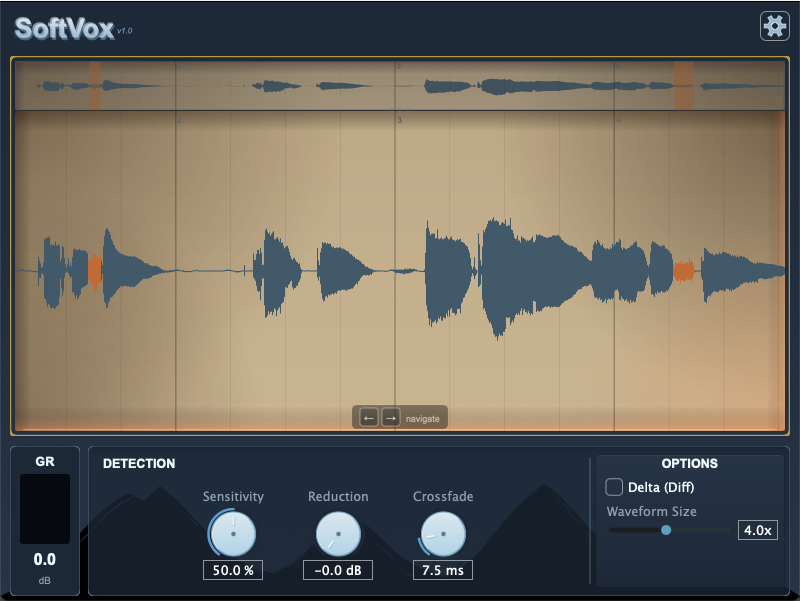
When you manually clean vocals with clip gain, you're targeting individual events—not EQ'ing the whole vocal. SoftVox does the same thing: detects sibilants, plosives, and breaths individually, applies precise gain reduction with smooth crossfades, leaves everything else untouched. The vocal stays open and alive—just like when you do it by hand. You just get your evenings back.
One-time payment. Free updates.
Or start a 14-day free trial — no credit card required.
Not ready to buy?
Try it free for 14 days. Full plugin, zero nags. Enter your email and get instant access.
No credit card, no commitment. It just stops working after 14 days.
Your trial ended
Looks like you've used SoftVox before. Ready to get the full version?
Get SoftVox — $19You're all set Welcome back
You've got to try it on your own vocals — full plugin, zero nags.
You have left on your trial. Your license is active.
Save this — you'll need it during installation
A backup is on its way to your email (check spam if not received).
Next steps:
- 1 Download and run the installer below
- 2 Open your DAW and add SoftVox to a vocal track
- 3 Paste your license key when the activation window appears
How it works: ML-trained detection analyzes the audio in real-time and finds sibilants, plosives, and breaths. You can see every detection on the waveform—no black box, no mystery.
Three detection modes: Sibilance, hard consonants, breath—or target all of them at once. Each detected event is individually editable with per-event reduction, timing, and crossfade controls.
Runs on Mac: VST3, AU, Standalone. If your DAW hosts plugins, this works.
Stuff you might be wondering
Can I try it first?
Yes! Start a 14-day free trial. No credit card, no commitment. If you like it, buy it. If not, it just stops working.
Why is it so cheap?
Launch pricing. I need early users to tell me what to improve. Once I've learned enough from real sessions, the price goes up.
Updates cost extra?
No. You pay once, every update is free. If I ever release a v2.0 way down the line, I'll figure out something fair for early buyers.
macOS